Connecting a switch to GNS3
Connecting a switch to GNS3
VLANs
MAC Table overflow
Working setup:
- 1 x 3560 L3 Switch
- Arch Linux x86_64
- GNS 3 v. 1.2.3 w/c7200-adventerprisek9-mz.151-4.M4.image
You need to set the options in dynamips executable to allow normal users alterations to network interfaces
sudo setcap cap_net_raw,cap_net_admin+eip /usr/bin/dynamips
Otherwise you may receive “206-unable to create Linux raw or generic Ethernet” or something similar.
More info here
- plug cable into the switch
-
make sure you can reach the switch I have:
SW-A# sh int vlan 1 Internet address is 192.168.4.42/24) - on the NIC you can issue:
ip addr add 192.168.4.15/24 dev enp4s2where enp4s2 is whatever NIC you have - enable ssh and configure a user
mig@jenkins ~ % ssh x@192.168.4.42
Password:
SW-A#
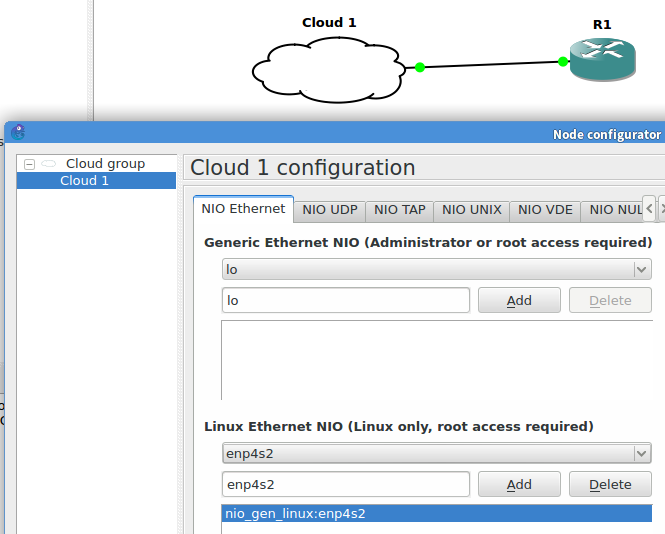
On R1:
-
set the interface to “duplex full” otherwise you’ll receive this on SW-A
: %CDP-4-DUPLEX_MISMATCH: duplex mismatch discovered on FastEthernet0/1 (not half duplex), with R1 FastEthernet0/0 (half duplex).
SW-A#sh cdp nei

Capability Codes: R - Router, T - Trans Bridge, B - Source Route Bridge
                  S - Switch, H - Host, I - IGMP, r - Repeater, P - Phone

Device ID        Local Intrfce     Holdtme    Capability  Platform  Port ID
R1               Fas 0/1           105         R          7206VXR   Fas 0/0
VLANs
Prepare interface on switch:
interface FastEthernet0/1
switchport trunk encapsulation dot1q
switchport mode trunk
DTP packets start arriving
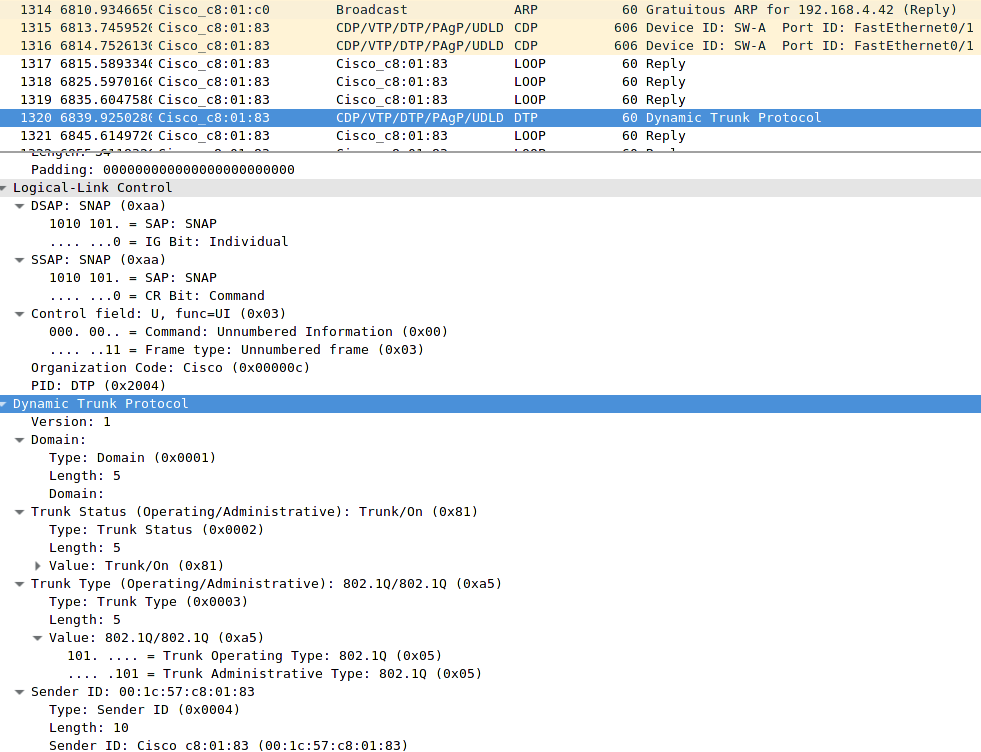
Interface is now trunk so it does not show on this output
SW-A#sh vlan br

VLAN Name                             Status    Ports
---- -------------------------------- --------- -------------------------------
1    default                          active    Fa0/2, Fa0/3, Fa0/4, Fa0/5
To see trunk interfaces:
SW-A#sh int trunk

Port    Mode    Encapsulation  Status        Native vlan
Fa0/1   on      802.1q         trunking      1
Configure a SVI
SW-A(config)#vlan 100
00:51:25: %LINK-5-CHANGED: Interface Vlan100, changed state to administratively down
00:51:26: %LINEPROTO-5-UPDOWN: Line protocol on Interface Vlan100, changed state to down
SW-A(config)#int vlan 100
00:51:33: %LINK-3-UPDOWN: Interface Vlan100, changed state to up
00:51:34: %LINEPROTO-5-UPDOWN: Line protocol on Interface Vlan100, changed state to up
SW-A(config-if)#ip addr 10.1.1.1 255.255.255.240
On the PC side:
-
Create the VLAN device
ip link add link enp4s2 name enp4s2.100 type vlan id 100 -
add an ip
ip addr add 10.1.1.1/30 brd 10.1.1.3 dev enp4s2.100 -
bring it up
ip link set dev enp4s2.100 up
You can check the status by:
~ % ip -d link show enp4s2
3: enp4s2: <broadcast> mtu 1500 qdisc fq_codel state UP mode DEFAULT group default qlen 1000
    link/ether 00:22:15:63:cf:0d brd ff:ff:ff:ff:ff:ff promiscuity 1

~ % ip -d link show enp4s2.100
5: enp4s2.100@enp4s2: <no-carrier> mtu 1500 qdisc noqueue state LOWERLAYERDOWN mode DEFAULT group default
    link/ether 00:22:15:63:cf:0d brd ff:ff:ff:ff:ff:ff promiscuity 0
    vlan protocol 802.1Q id 100 <reorder_hdr>
A virtual network device called enp4s2.100 would be created, bound to VLAN ID 100 of the physical interface enp4s2.
- Inbound 802.1Q-encapsulated frames arriving on
enp4s2with a VLAN ID of 100 are detagged, then re-presented to the network stack as inbound frames arriving onenp4s2.100 - Outbound frames sent to
enp4s2.100are tagged with a VLAN ID of 100, then passed toenp4s2for transmission.